Most CRMs live apart from the tools that actually deliver the work, which means every won deal gets manually re-typed into a project tracker. Autovella's CRM sits on the same data model as projects and billing, so accounts, contacts, and deals flow straight through to delivery.
In this guide
Setting up accounts and contactsRunning your deal pipelineConverting a won deal into a projectKeeping pipeline data cleanFrequently asked questions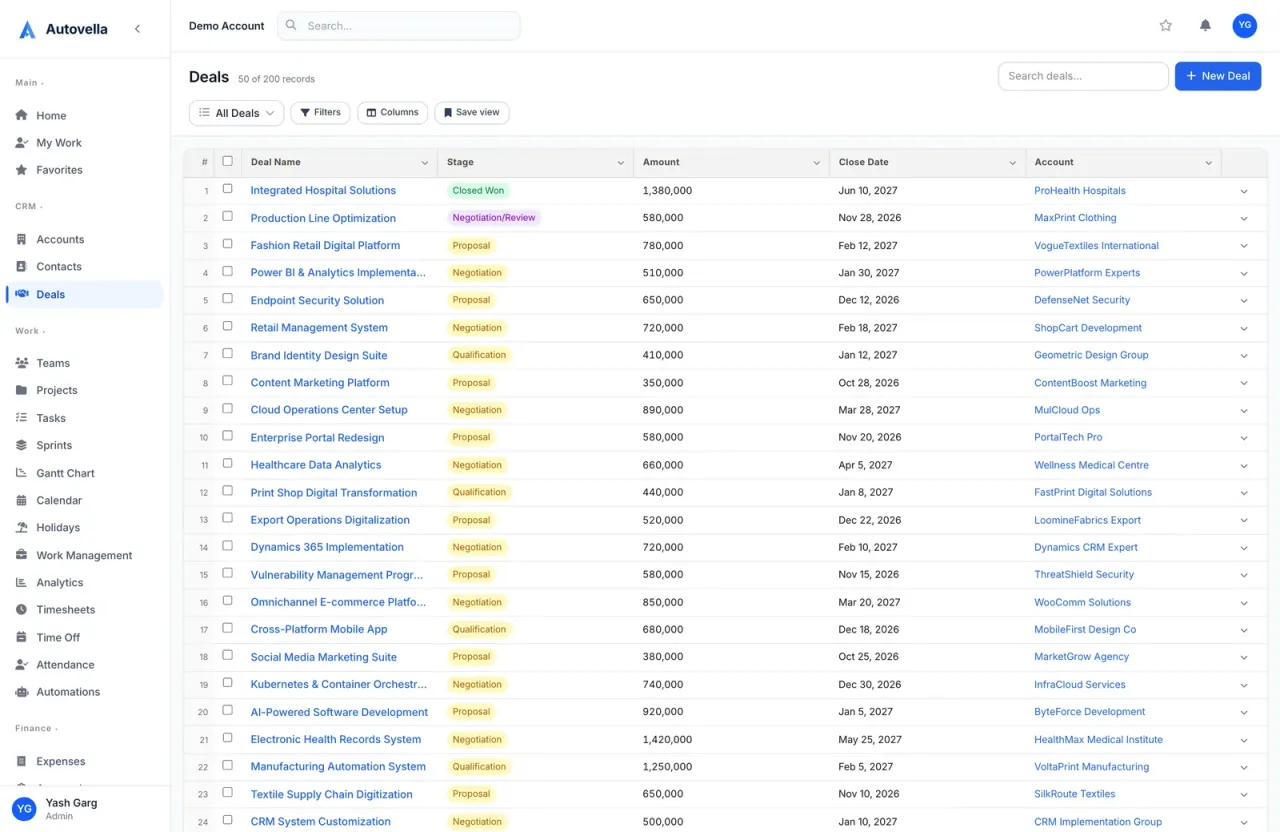
Setting Up Accounts and Contacts
An account represents a client company; contacts are the individual people at that account. Create an account from CRM → Accounts → New, then add contacts underneath it, each contact can be tagged with a role (decision maker, day-to-day contact, billing contact) so the right person is easy to find when you need to send an invoice or schedule a kickoff call.
Every account carries its own activity history: emails, calls, notes, deals, and eventually projects and invoices, all in one place. That means anyone on your team opening an account record sees the full relationship, not just the sales side of it.
Running Your Deal Pipeline
Deals live on a visual, drag-and-drop pipeline under CRM → Deals. Default stages, Qualifying, Proposal Sent, Negotiation, Won, Lost, can be renamed or reordered to match how your team actually sells. Drag a deal card between stages to update it, or open a deal to log activity, attach a proposal document, and set an expected close date.
Each deal can carry an estimated value and probability, which roll up into pipeline forecasting so leadership can see expected revenue by stage without exporting anything to a spreadsheet.
Converting a Won Deal Into a Project
When a deal is marked Won, an action on the deal lets you convert it directly into a project, carrying over the account, contacts, and deal value as the project budget. Nobody has to open a separate tool and rebuild the client record, the project starts already linked to the right account and billing contact.
This is the step that saves the most rework. Firms running CRM and delivery in separate tools typically lose a day or more per deal re-entering client details, scope, and budget into a project tracker. Converting in one click removes that step entirely.
Keeping Pipeline Data Clean
- Set a required expected-close date on every open deal so forecasting stays accurate
- Archive or mark deals Lost instead of leaving them stalled in an active stage
- Use account-level tags for industry or segment so you can filter pipeline reports
- Review duplicate contacts monthly, most duplicates come from re-imported spreadsheets
Clean pipeline data compounds: a pipeline that accurately reflects reality is what makes revenue forecasting and capacity planning trustworthy months later.
See the CRM connected to delivery
Watch a deal move from pipeline to a fully scoped, billable project in one click.
Frequently asked
Yes. Stage names, order, and count are fully configurable per pipeline from CRM settings, so you can match Autovella to your existing sales process instead of adapting your process to the tool.
The deal's value becomes the project's initial budget, which you can adjust before work starts. Time and expenses logged against the project can then be compared directly to that original budget for profitability reporting.
Yes, an account can have any number of contacts, each with their own role tag, so your team always knows who to loop in for approvals, billing questions, or project updates.