Capacity planning is only as good as the data behind it. If a team member's approved leave or a regional holiday isn't reflected in the system, resourcing views will show them as available when they're not. Autovella keeps time off, holidays, and attendance in the same place as project resourcing so the two stay in sync automatically.
In this guide
Requesting and approving time offSetting up holiday calendarsTracking attendanceHow this affects capacity planningFrequently asked questions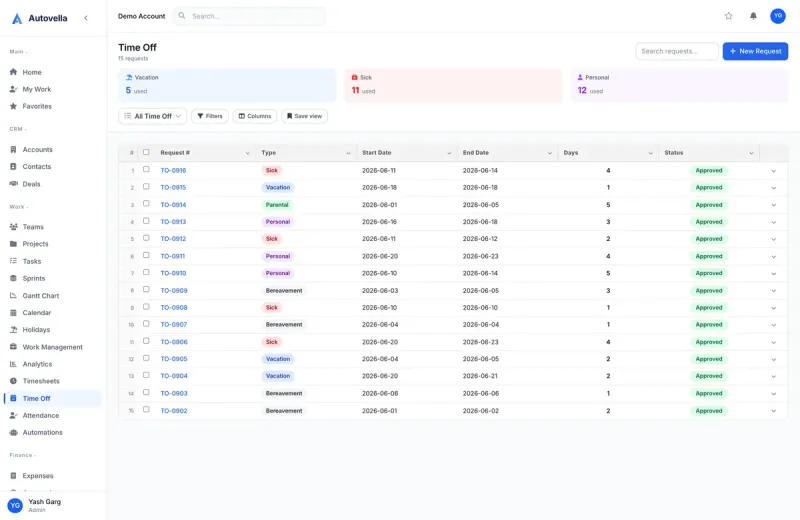
Requesting and Approving Time Off
Team members submit time-off requests from their profile, selecting a date range and leave type (vacation, sick, unpaid, or any custom type your organization has defined). The request goes to their manager's approval queue, the same queue used for timesheet approvals, so managers aren't checking multiple places for pending decisions.
Leave balances, when configured, deduct automatically on approval and are visible to the employee before they submit, so nobody requests more time than they actually have.
Setting Up Holiday Calendars
Company holidays are managed centrally under Settings → Holidays, and can be split into multiple calendars for teams working across regions with different public holidays. Assign each team member to the calendar that matches their location, and their view of availability, plus every resourcing chart that includes them, respects those dates automatically.
Recurring holidays (national holidays that fall on the same date every year) can be marked as such so they don't need to be re-entered annually.
Tracking Attendance
For teams that need check-in/check-out tracking rather than just timesheets, Autovella's attendance module records clock-in and clock-out events, with support for biometric or badge integrations on Enterprise plans. Attendance data feeds the same capacity calculations as time off and holidays, so a team member who hasn't clocked in shows correctly as unavailable in resourcing views.
How This Affects Capacity Planning
- Approved time off automatically removes that person from available capacity for those dates
- Holiday calendars apply org-wide or per-region, so scheduling never assumes someone's working a holiday
- Resourcing views recalculate in real time as requests are approved, no manual recalculation needed
- Historical attendance and time-off data feeds utilization reports for accurate rate benchmarking
See capacity planning stay accurate automatically
We'll show you how time off, holidays, and attendance connect to resourcing.
Frequently asked
Yes, you can create multiple holiday calendars and assign each team member to the one matching their location, so a global team's availability reflects local public holidays correctly rather than one shared calendar.
Approved time off removes that person from available capacity in resourcing and scheduling views for those dates, making it visually obvious they shouldn't be assigned new work, though a manager can still manually override if genuinely needed.
No, attendance tracking with hardware integrations is optional and available on Enterprise plans. Most teams start with timesheets and time off only, and add attendance tracking later if they need clock-in/clock-out records.