In Autovella, time is logged directly against the task it belongs to, not entered separately into a standalone timesheet tool. That single design choice is what lets an approved hour flow straight into an invoice later without anyone re-typing it, see Creating and Sending Invoices for that connection.
In this guide
Logging time against a taskSubmitting a weekly timesheetManager approvalsBillable vs non-billable timeFrequently asked questions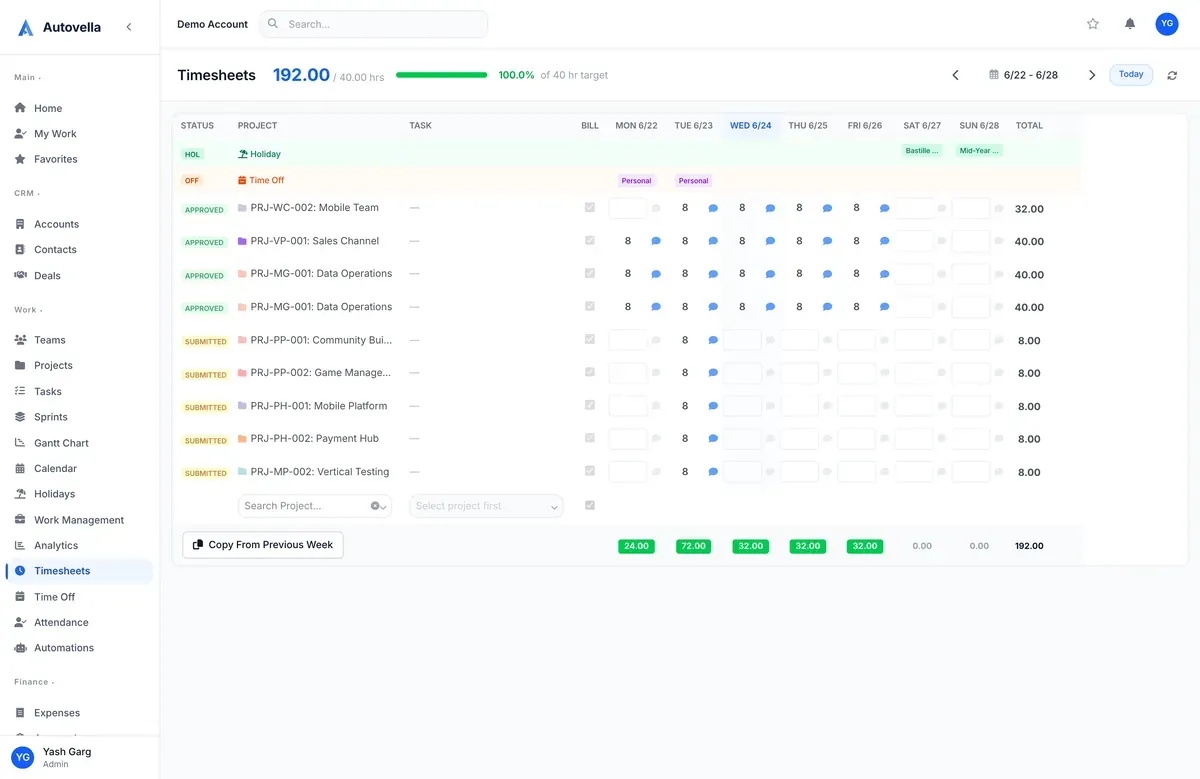
Logging Time Against a Task
Open any task and use the timer or manual entry to log hours. The built-in timer starts and stops in real time and rounds to your organization's preferred increment when stopped; manual entry lets you log hours after the fact for a specific date, useful for logging yesterday's work or catching up after time away.
Every entry is tied to the task, and therefore automatically tied to the task's project, client, and billing rate, there's no separate step to link a time entry back to what it was for.
Submitting a Weekly Timesheet
The Timesheets view rolls up all time entries for the week into a single grid, organized by project and day, so you can review everything logged before submitting. Gaps show clearly (an empty cell for Tuesday is easy to spot), which is what makes catching missing entries before submission realistic instead of relying on someone noticing weeks later.
Once submitted, a timesheet locks from further edits and moves into your manager's approval queue. If a correction is needed after submission, it has to be unlocked by the manager, which keeps an audit trail of who approved what and when.
Manager Approvals
Managers review submitted timesheets from a single approval queue rather than chasing team members individually. Each entry can be approved, or flagged with a comment if something looks off (a suspiciously round number, a task logged against the wrong project), sending it back for correction instead of silently approving inaccurate data.
Only approved time should flow into invoices. Requiring approval before billing means every invoice reflects time a manager has actually reviewed, not just whatever an individual happened to log, which is what keeps billing disputes rare.
Billable vs Non-Billable Time
- Mark internal meetings, training, and admin time as non-billable so it doesn't leak into client invoices
- Set a default billable/non-billable flag per project so most entries don't need manual tagging
- Review your billable ratio monthly, it's one of the clearest signals of team utilization
- Use a specific task or project for PTO and internal work so it's easy to filter out of client reporting
See Understanding Analytics and Reports for how billable ratio and utilization roll up into firm-wide dashboards.
See timesheets flow straight into approvals and invoices
We'll walk through logging, submission, and approval end to end.
Frequently asked
Yes, manual entry lets you log hours for any past date within your organization's allowed backdating window, useful for catching up after a busy day or correcting a missed entry before submitting your timesheet.
Submitted timesheets lock automatically. A manager can unlock a specific entry for correction from the approval queue, which preserves a clear audit trail of what was changed and by whom.
Each time entry carries a billable/non-billable flag, usually defaulted at the project level (client projects default billable, internal projects default non-billable), which can be overridden per entry when needed.