Expenses are one of the easiest things to lose track of in a services business, a receipt sits in someone's inbox, gets forgotten, and never makes it onto the client invoice it should have. Logging expenses directly against the project they belong to closes that gap.
In this guide
Logging an expenseCategorizing expensesExpense approvalBilling expenses to clientsFrequently asked questions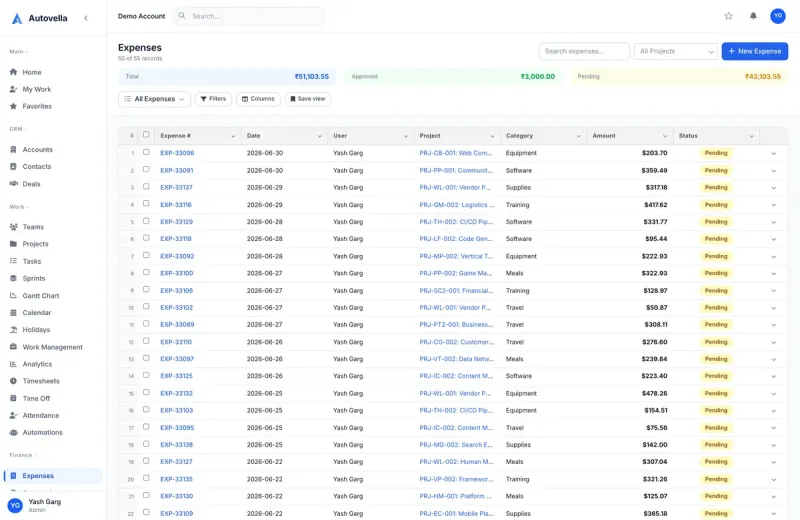
Logging an Expense
From a project, select New Expense, enter the amount, date, category, and an optional receipt attachment (photo or PDF upload). Expenses can be logged by anyone with access to the project, not just finance, so the person who actually incurred the cost, a consultant who bought a client lunch, a contractor who paid for software, logs it themselves at the time.
Categorizing Expenses
Default categories (Travel, Software, Meals, Materials, Other) can be customized under Settings → Expense Categories to match how your firm actually reports costs. Consistent categorization is what makes expense reporting useful later, a category breakdown across all projects shows exactly where cost is concentrated, without anyone manually tagging a spreadsheet after the fact.
Expense Approval
Like timesheets, expenses route to a manager approval queue before they're considered billable or reimbursable. A manager can approve, or flag an expense with a comment (missing receipt, wrong category, questionable amount) and send it back for correction.
Requiring receipts on approval, not just at submission, catches more issues. A reviewer checking a receipt against the logged amount before approving is what prevents an inflated or miscategorized expense from ever reaching a client invoice.
Billing Expenses to Clients
- Mark an expense billable or non-billable at the time it's logged, defaulting from the project's settings
- Approved billable expenses appear automatically as line items when you generate the project's invoice
- Attach the original receipt to the invoice line item for client transparency on itemized bills
- Review non-billable (internal) expenses separately, they still matter for true project cost and margin
See Creating and Sending Invoices for how approved expenses flow into a generated invoice alongside billable time.
See expenses flow from receipt to invoice line item
We'll walk through logging, approving, and billing an expense end to end.
Frequently asked
Anyone with access to the project can log an expense, not just an admin or finance role, since the person who incurred the cost is usually best placed to record it accurately at the time.
Non-billable expenses still count toward true project cost and margin in profitability reporting, they simply don't appear as a line item on the client's invoice. This keeps internal cost tracking accurate without over-billing a client.
Yes, your organization can require a receipt attachment before an expense is eligible for approval, which is a common setting for firms that need documentation for every billable or reimbursable cost.