Professional services firms sell time and expertise, so the money lives in the handoffs: deal to project, project to timesheet, timesheet to invoice. Autovella connects those handoffs. Win a deal, Convert to Project, log time on Timesheets, approve it in Approvals and use Generate from Project to invoice approved billable time. This playbook shows the configuration, the roles, and the reports to watch, and is plain about what is not built in.
In this guide
Who is this playbook for and what problems come up?How do I map my firm onto Autovella?Which roles and permissions suit a services firm?What are the recommended setup steps?Which automations and reports should we turn on?What should a professional services firm measure?What does Autovella not do for professional services?Frequently asked questions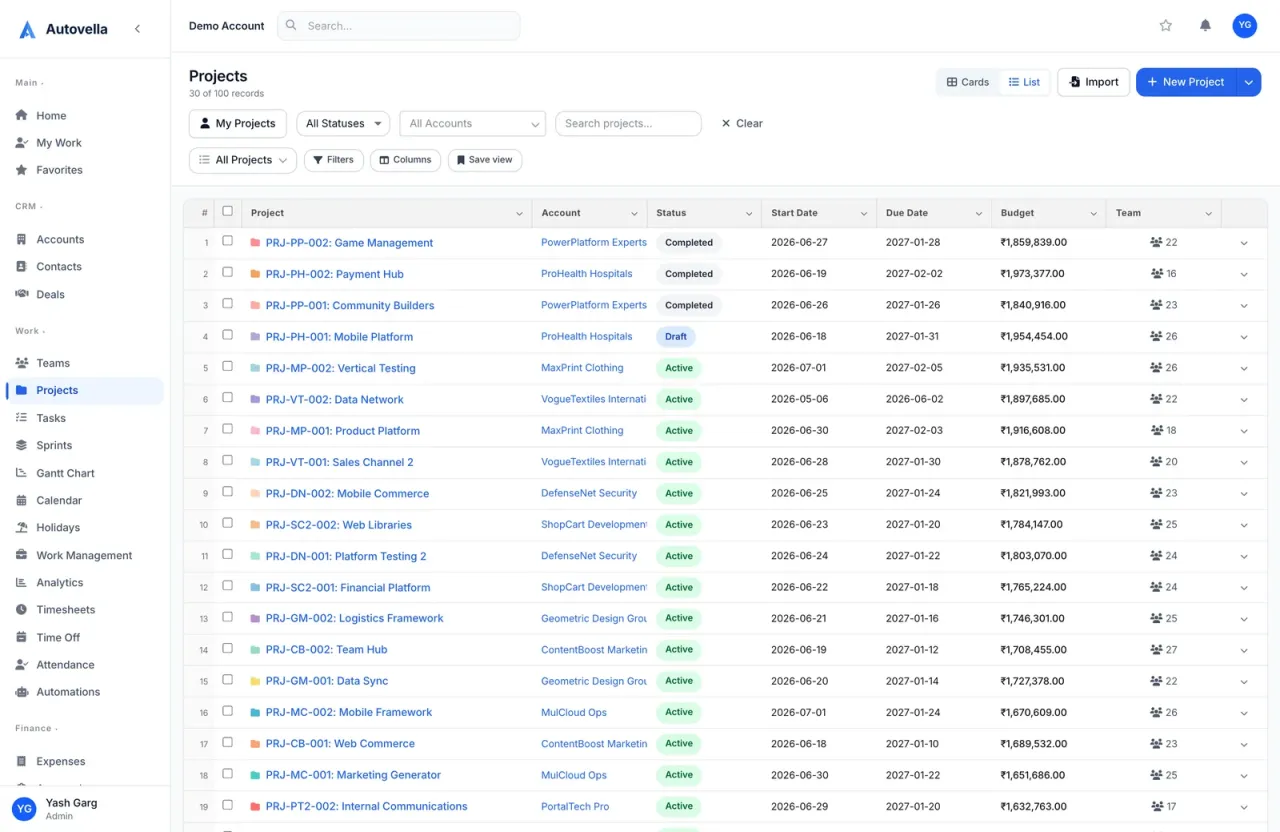
Who is this playbook for and what problems come up?
It is for consultancies, advisory and accounting practices, engineering and field service teams, and any firm of roughly 5 to a few hundred people that bills clients for work done. The common problems are a CRM that is disconnected from delivery, time tracked in spreadsheets, month-end billing that depends on one person chasing hours, and no live view of who is overloaded or which projects are over budget.
Autovella puts those on one data model, so you do not re-key a client or an amount between tools. For positioning and examples see the professional services use case and features.
How do I map my firm onto Autovella?
- Clients and prospects are Accounts, with Contacts under them. Type can be Customer, Partner, Prospect, Reseller or Other.
- Sales opportunities are Deals, moving through seven stages from Prospecting to Closed Won or Closed Lost, with line items for the scope.
- Engagements are Projects with a Budget, dates, Team members and Status (Draft, Active, On Hold and so on).
- Deliverables are Tasks grouped in Sections, with estimated hours, shown as Board, List, Calendar or Gantt.
- Work done is Timesheets and Expenses, with a Bill / Billable to client flag on each.
- Billing is Invoices, generated from approved time and expenses or built from custom lines.
- Risks and blockers go to the RAID tab on each project (see RAID log).
Convert to Project on a won deal creates a project with the deal's name, account, owner and currency, uses the amount as the budget, and turns each line item into a task. See Lead to invoice workflow.
Which roles and permissions suit a services firm?
- Owners and operations leads: Admin, for Settings, users and the recycle bin.
- Engagement managers and project leads: Manager, with full access to projects, tasks, approvals and automations and read access to Analytics.
- Consultants and delivery staff: Employee, who log time, expenses and time off.
- Freelancers and subcontractors: Contractor, with read-only project access and the ability to log time and expenses.
- Finance and billing: Finance, with invoices, expenses, timesheets and approvals, and read access to projects, accounts and analytics.
- Clients: either the Customer role for a read-oriented view of their projects and tasks, or a read-only guest link from Share on a project, which never shows budget, owner, members or rates (see Sharing projects and guest links).
Managers see the timesheets of their direct reports and of projects they own, so set each person's Manager on their profile so approvals route correctly. Use a custom role or a permission set when someone needs extra access, for example giving a senior manager the View Cost & Bill Rates flag. Details in Roles, permissions and team sharing.
What are the recommended setup steps?
- Company basics. An admin sets company details, default currency, tax and invoice defaults in Settings > Company Settings. If you bill internationally, enable and configure multi-currency (see Multi-currency and GST setup).
- Bring in data. Use Import on Accounts, Contacts and Projects with CSV files (see Importing data).
- Invite people and teams. Create users, assign roles and set each person's Manager. On the Teams page create teams with a Team Lead.
- Build a standard engagement project. Create a representative engagement with Sections and tasks, and start new engagements via New Project > From Existing Project.
- Set expectations on time. Ask everyone to submit with Submit Week every week. Approvers work through Approvals > Timesheets and Approvals > Expenses.
- Branded invoices. Admins create an Invoice Template in Settings > Company Settings > Invoices (see Invoice and quote templates) and set default payment terms and notes.
- Bill. On Invoices, Generate from Project for time and materials work, or New Invoice with Custom Items for fixed-fee milestones. Then Mark as Sent and record payments.
- Plan capacity. In Work Management, set task estimated hours and use the Overview and Schedule views (see Resource planner and workload).
See lead-to-invoice on one platform
Book a demo to walk through deal, project, timesheet and invoice with your own workflow, or compare plans on the pricing page.
Which automations and reports should we turn on?
- Approval nudges: Automations rules on Timesheet submitted and Expense submitted that notify the submitter's manager or all Finance users (see Setting up automation rules).
- Project handoffs: a rule on Project status changes or Member is added to a project that sends a notification, or sends a webhook to Zapier or Make for tools outside Autovella.
- Weekly finance report: a scheduled report or alert on Invoices or Time Entries, emailed on a weekly schedule (see Scheduled reports and alerts).
- Dashboards: admins choose what each role sees under Settings > Customization > Dashboards.
- Analytics tabs: Overview, KPIs (SPI, CPI, Resource Utilization), Projects and Finance, including Gross Margin and Realization Rate when cost rates are set (see Analytics and reports).
What should a professional services firm measure?
- Billable Ratio and Resource Utilization from Analytics, plus each person's page in Work Management, which shows billable versus non-billable hours.
- Budget Used and CPI per project, which need a Budget and cost rates to be meaningful.
- Gross Margin, Effective Bill Rate and Realization Rate on the Finance tab.
- Approval lag: the Pending Approval tile on Timesheets and the Approvals queue.
- Receivables: Total Invoiced and Outstanding on the Invoices list, and Overdue status on invoices.
- Pipeline: Deal Pipeline chart for roles with CRM access.
The numbers are only as good as the inputs: keep time submitted, invoices sent and payments recorded.
What does Autovella not do for professional services?
- No rate card per timesheet entry. Hours do not store a rate. The rate is applied when you generate the invoice or set on the project member.
- No automatic recurring invoices. There is no scheduler that creates the next invoice on its own (see the retainer guide).
- No general ledger or full accounting. Autovella handles invoicing, payments and expenses, not bookkeeping, payroll or tax filing. Tax rate, discount and currency are available on invoices.
- No sector certifications implied. Check the Trust and security pages on the site for what is documented, and do not infer compliance from this guide.
Frequently asked questions
Yes, with one click. Open the won deal and click Convert to Project. Autovella creates the project with the deal's name, account, owner and currency, uses the amount as budget and turns line items into tasks.
Time is logged on Timesheets, submitted with Submit Week and approved under Approvals. On Invoices, Generate from Project pulls approved billable entries for the chosen project and date range at the hourly rate you enter.
Yes. Create a guest link from Share on a project for a read-only page with status, dates, progress and a simple task list, or give a client user the Customer role. Guest links never show budget, members or rates.
Yes. Analytics shows Resource Utilization and Billable Ratio, and Work Management shows planned workload against capacity per person, with an Overloaded filter.
No. It covers invoicing, payment recording and expenses for projects. It is not a general ledger, payroll or tax filing tool.