Agencies can run pipeline, client projects, time, expenses and invoices in Autovella without moving data between tools. Retainers work with a manual pattern: a long-running Project per client, logged hours to track burn, and Custom Items on a New Invoice for the monthly fee. Autovella does not automatically generate recurring invoices or draw down a retainer balance, and this guide says exactly where that line is.
In this guide
Who is this for and what are typical agency pains?How do I map agency work onto Autovella?How do retainers work in Autovella today?Which roles should an agency use?What are the recommended setup steps?Which automations and reports are worth enabling?What should an agency measure?Frequently asked questions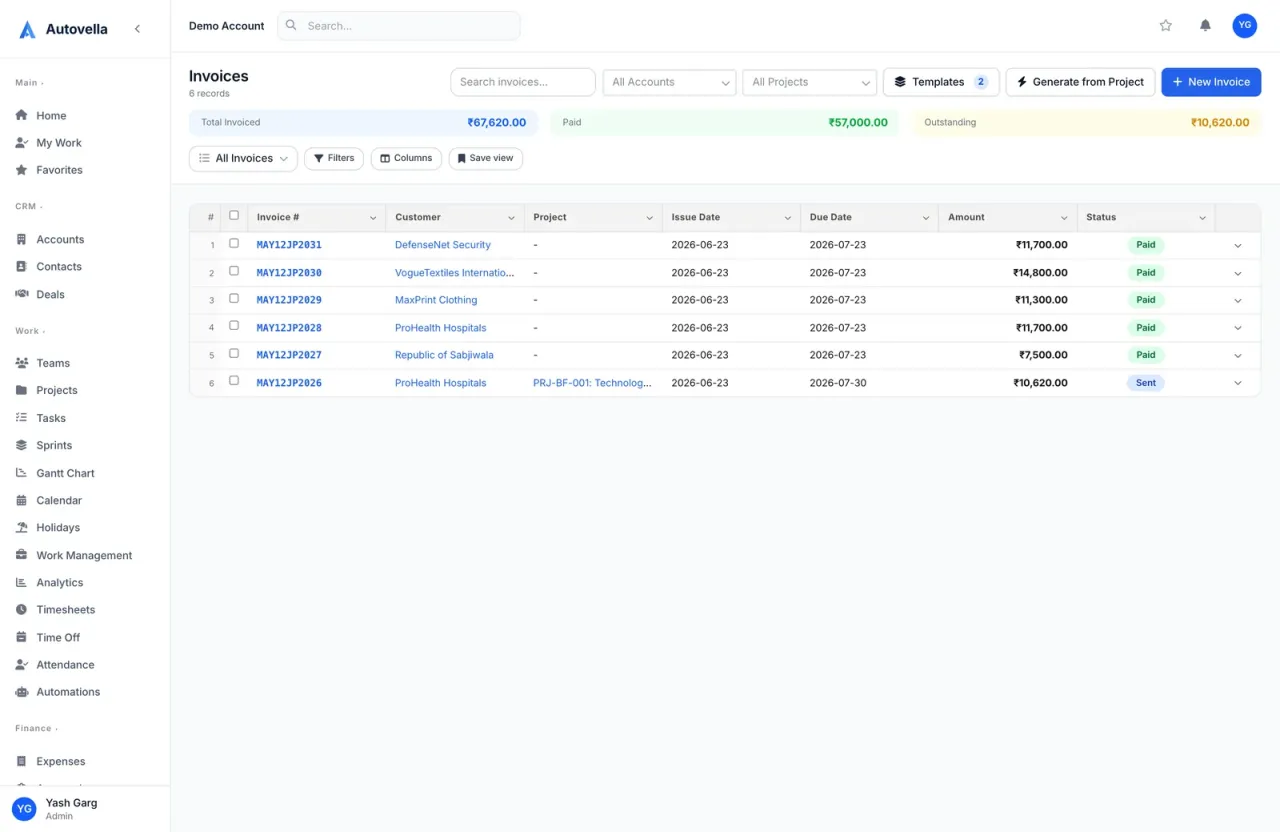
Who is this for and what are typical agency pains?
It is for creative, digital, SEO, marketing and design agencies with teams from a handful to a few hundred people. Typical pains are a CRM for new business, another tool for delivery, spreadsheets for hours and a separate invoicing app, so utilization is invisible and month-end billing is slow. For positioning, see Autovella for agencies.
How do I map agency work onto Autovella?
- Client = Account, with Contacts for the people you deal with.
- New business = Deals on the pipeline Board, with line items describing the scope. Convert to Project when won (see Managing accounts, contacts and deals).
- Campaign or fixed-scope job = Project with a Budget, using Sections for phases and the Board view for status.
- Retainer = a long-running Project per client (or one per month), with tasks for the recurring deliverables and a Budget that reflects the hours or amount you sold.
- Sprints are available if your team delivers in agile iterations (see Sprints and agile planning).
- Pass-through costs = Expenses, such as media or stock assets, with Billable to client ticked and a receipt attached (see Tracking expenses).
How do retainers work in Autovella today?
Autovella supports the tracking side of retainers and a manual billing side. Here is the honest picture.
What works
- Log every retainer hour on Timesheets against the client's project, with the Bill box ticked or unticked depending on whether the hour is inside or outside the agreement.
- Watch the project's Hours Logged and Budget Used on its Overview and Health tabs to see how much of the retainer is consumed.
- Invoice the monthly fee with New Invoice, then Edit and Add Custom Item with a description (for example "Monthly retainer"), quantity and rate. Use Net 15, Net 30, Net 60 or Due on Receipt payment terms.
- Bill overage separately using Generate from Project for the date range after the included hours.
- Remind yourself each month with a scheduled report or an automation (see below).
What does not exist
- No automatic creation of the next invoice on a schedule. Invoices have a recurring flag in the data model and in the invoice filter, but we have not found an in-app setting that generates new invoices from it, so plan on creating each one yourself.
- No automatic retainer balance, rollover of unused hours or drawdown. Track these from the project's hours and your own notes.
- Time entries do not store a rate, so the rate is chosen when you build the invoice.
Tip. Keep a well-structured retainer project and start each new client from New Project > From Existing Project.
Which roles should an agency use?
- Founders and ops: Admin.
- Account directors and producers: Manager, who see their team's approvals and Analytics but not invoices unless granted.
- Designers, developers, copywriters: Employee.
- Freelancers: Contractor (log time and expenses, read-only projects).
- Finance or studio manager: Finance, with invoices, expenses and approvals.
- Clients: a read-only guest link from Share on the project, or the Customer role.
If an account director needs to see invoices for their clients, use a permission set or per-user grant instead of making them Finance. See Roles, permissions and team sharing and Sharing projects and guest links.
Run your agency from pitch to paid invoice
Book a demo to see deals, projects, time and invoices work together for an agency, or check the pricing page.
What are the recommended setup steps?
- Import clients and contacts through Import on Accounts and Contacts (Importing data).
- Create teams on the Teams page (for example Design, Dev, Paid Media) with a Team Lead, then add them to projects with Add Team.
- Make a standard retainer project and a standard campaign project, each with Sections and starter tasks, and copy them for each new client with New Project, From Existing Project.
- Set the time habit: everyone logs hours on Timesheets and clicks Submit Week. Managers approve under Approvals > Timesheets.
- Billing day: Finance opens Invoices, uses Generate from Project for hourly work, or New Invoice with Custom Items for the retainer fee, checks the draft, then Mark as Sent (see Creating and sending invoices).
- Automatic client email: connect a mailbox under Settings > Company Settings > Email and add an automation with trigger Invoice is sent and action Send email.
- Currencies: if you serve clients abroad, enable multi-currency (Multi-currency and GST setup).
- Capacity: review Work Management for overloaded people before accepting new retainers (Resource planner and workload).
Which automations and reports are worth enabling?
- Task status automation: a rule on Task status changes (for example In Progress to Done) that notifies the project manager (see Setting up automation rules).
- Monthly billing reminder: a Scheduled Report on Time Entries or Projects, set to a custom cron schedule, emailed to Finance (see Scheduled reports and alerts).
- Overdue invoice alert: an Alert on Invoices that emails only when matching records exist.
- Analytics: Billable Ratio, Resource Utilization and Finance tab figures (see Analytics and reports).
What should an agency measure?
- Retainer burn: Hours Logged and Budget Used per client project.
- Utilization and billable ratio per person and team.
- Profitability by client: Gross Margin and Realization Rate on the Finance tab, once cost rates are set.
- Overdue invoices and Outstanding totals.
- Workload: the Overloaded filter in Work Management.
Autovella does not publish a benchmark for any of these, so set your own targets and review them on a regular cadence.
Frequently asked questions
No. Autovella does not generate recurring invoices on a schedule. Create the monthly invoice with New Invoice and a Custom Item, and use a scheduled report or automation as a reminder.
Partly. Log time against the client project and watch Hours Logged and Budget Used on the project. There is no built-in retainer balance or rollover of unused hours.
Use Generate from Project on Invoices with a From Date and To Date covering the overage period. Only approved, billable time and approved expenses are included, at the hourly rate you enter.
Yes. Click Share on a project and create a guest link. It is read-only, shows status, dates, progress and a simple task list, and never shows budget, members or rates. You can set an expiry and revoke it later.
Yes, when multi-currency is enabled for your organization. A Currency field then appears on invoices and expenses, and admins manage the enabled currencies and rates.