Consulting firms live on utilization and margin. In Autovella you can model each engagement as a Project with a budget, set Cost Rate and Bill Rate per person, log hours on Timesheets, bill from approved time, and review Gross Margin, Realization Rate and earned-value measures such as SPI and CPI in Analytics. This playbook covers the setup, the roles, and the limits. For the product overview see Autovella for consulting.
In this guide
Who is this playbook for, and what pains does it address?How do I map an engagement onto Autovella?How do I handle time-and-materials, fixed-fee and milestone billing?Which roles and permissions should a consultancy use?What are the recommended setup steps?What should I automate and measure?What does Autovella not do for consultancies?Frequently asked questions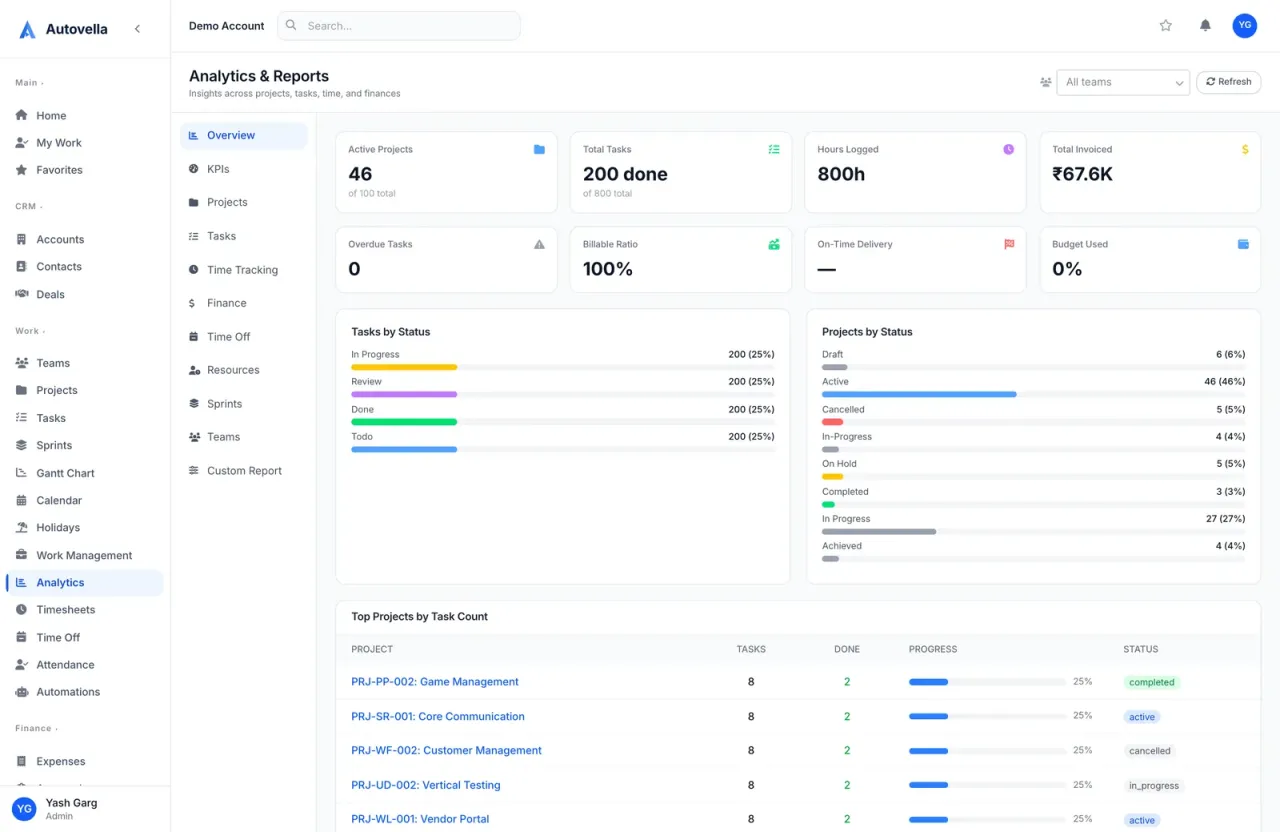
Who is this playbook for, and what pains does it address?
It suits IT, management and advisory consultancies from small boutiques to mid-sized firms that sell time-and-materials, fixed-fee or milestone engagements. Common pains: utilization and margin tracked in spreadsheets weeks after the fact, engagements billed in different ways, partners with no portfolio view, and unclear capacity when a new engagement lands.
Autovella reduces the gap between doing the work and seeing its financial effect, because time, expenses, budgets and invoices share one data model. It does not replace an accounting system.
How do I map an engagement onto Autovella?
- Account is the client organization, with Contacts for sponsors and stakeholders. See Managing accounts, contacts and deals.
- Deal is the proposal. Use stages from Qualification to Proposal/Price Quote and Negotiation/Review, and put your scope in the line items.
- Project is the engagement. Convert to Project on a won deal copies the account and amount (as budget) and turns line items into tasks.
- Tasks hold workstreams. Use Sections for phases, tick Milestone on key deliverables, and set Estimated Hours. Use the Gantt chart for dependencies. See Tasks, boards, calendar and Gantt.
- Timesheets and Expenses record effort and costs against the project and task.
- Invoices bill the client. See Billing a project from start to finish.
How do I handle time-and-materials, fixed-fee and milestone billing?
Time and materials. Use Invoices, Generate from Project. Pick customer, project and date range and enter the hourly rate. Approved, billable time becomes time lines and approved expenses become expense lines. Always overwrite the pre-filled hourly rate with your real one.
Fixed fee and milestones. Create a blank invoice with New Invoice, choose the Account and Project, open it, click Edit and use Add Custom Item for each milestone or fee, with a description, quantity and rate. Keep logging time against the project as usual, so you can still compare effort with the fee.
Retainers. Autovella has no retainer object or drawdown balance. You can run a retainer as a project with a budget and invoice the agreed amount with a custom item each period. See Creating and sending invoices.
Billing in other currencies and country tax rules are covered in Multi-currency and GST setup.
Which roles and permissions should a consultancy use?
- Admin for managing partners and operations. Reserve it for few people.
- Manager for engagement leads. Full project, task, team, approval and automation access, read access to Analytics, and the View Cost & Bill Rates flag by default.
- Employee for consultants. They log time and expenses and edit tasks, but cannot see invoices or CRM.
- Contractor for subcontractors. Read-only on projects, with time and expense logging.
- Finance for the billing owner. Full invoices, expenses, timesheets and approvals.
Margin data is sensitive. Cost and bill rate visibility is controlled by the View Cost & Bill Rates flag, so check which custom roles hold it. For client-confidential engagements set Projects to Private in Settings, Users & Access, Org-Wide Defaults and add only the engagement team on the project's Team tab. See Roles, permissions and team sharing.
Bring margin into view
Set rates, budgets and a weekly time rhythm, and your utilization and margin reports fill themselves. Book a demo to walk through an engagement.
What are the recommended setup steps?
- Set your corporate currency in Settings, Company Settings, Company Information.
- Create users and set rates. On each person's profile set Cost Rate (what they cost the business) and Bill Rate (charged to clients), hourly or daily. Without cost rates, Profitability shows as unavailable.
- Set Org Chart managers. Reporting lines decide whose timesheets a manager can approve.
- Create a standard engagement project. Build a project with sections, milestone tasks and typical estimated hours, then Keep it as your master copy and start engagements from New Project, From Existing Project. Always fill Budget, since Budget Used and CPI depend on it.
- Add the team. On the Team tab choose Add Member, give a project Role label, an Access Level and, if needed, a project-specific bill rate.
- Use the RAID Log. Record risks, assumptions, issues and dependencies on each project. See RAID log.
- Plan capacity in Work Management, Schedule by typing hours per person per day. Holidays and approved time off are marked. See Resource planner.
- Agree a weekly rhythm: consultants submit timesheets by a set day, managers approve in Approvals, Timesheets. See Time tracking and timesheets.
What should I automate and measure?
Automations worth creating: notify the manager on Timesheet is submitted; notify Finance when an Expense is submitted; notify the project manager on Project status changes to On Hold. See Setting up automation rules. Add a scheduled alert on Invoices for overdue balances, using Scheduled reports and alerts.
Measure in Analytics:
- KPIs tab: SPI, CPI, Schedule and Cost Variance, BAC, Milestone Hit Rate, Resource Utilization and a Per-Project EVM table. Indexes at or above 1.00 are healthy.
- Finance tab: Gross Margin, Labor Cost, Effective Bill Rate and Realization Rate.
- Billable Ratio on the Overview tab.
- Per-person pages under Work Management: hours logged, billable percentage and time by project.
These figures depend on discipline: hours logged, budgets set, cost rates entered and invoices marked paid.
What does Autovella not do for consultancies?
- No dedicated retainer drawdown or fixed-fee revenue recognition. Milestone and fixed-fee billing is done with custom invoice lines.
- No automatic recurring invoices. Create each period's invoice yourself.
- No proposal e-signature or contract management. Deals hold line items and documents, and quote templates are covered in Invoice and quote templates.
- No accounting ledger, payroll or tax filing. Autovella records invoices and payments but is not your books.
Frequently asked questions
Yes, on the Finance tab in Analytics, roles with access to cost data see Gross Margin, Labor Cost, Effective Bill Rate and Realization Rate. You must set Cost Rates for your people first, otherwise Profitability is unavailable.
Analytics has a KPIs tab with SPI, CPI, Schedule and Cost Variance, BAC and a Per-Project EVM table. These rely on project budgets, dates and task progress being maintained.
Create an invoice with New Invoice, link the project, and add Custom Items for each milestone. Generate from Project is designed for time and expenses, so it suits time-and-materials work.
Yes. Cost and bill rate visibility is governed by the View Cost & Bill Rates flag, which Admins and Managers hold by default. Employees do not see invoices at all by default.
Open Work Management to see utilization per person for a day, week, month or quarter, filter to Available, and schedule hours per task. It accounts for holidays and approved time off.