This glossary defines the words used across Autovella, in alphabetical order, from Account to Work Management. Each entry is one or two sentences with a link to the full guide, so you can look up a term such as Org-Wide Default, Record Type or RAID and jump straight to the steps.
In this guide
Autovella glossary: terms A to CAutovella glossary: terms D to OAutovella glossary: terms P to RAutovella glossary: terms S to ZFrequently asked questions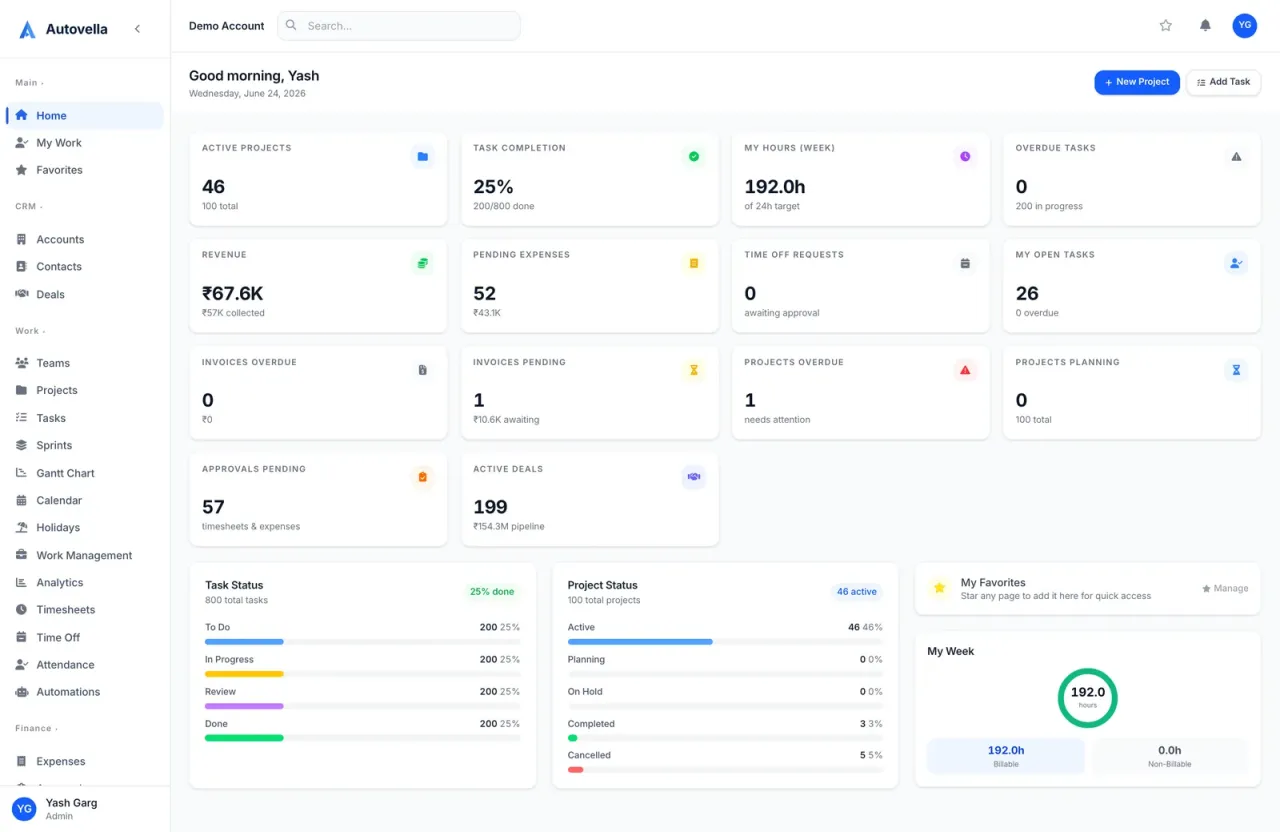
Autovella glossary: terms A to C
Short definitions of the words you will meet in Autovella, with a link to the guide that explains each one in depth.
- Account: a company or organization you work with, stored in the CRM. Contacts, deals, projects and invoices can all be linked to an account. See Managing accounts, contacts and deals.
- Approvals: the page where people with approval authority review submitted timesheets, expenses and time off requests. See Approvals for timesheets, expenses and time off.
- API key: a machine credential starting with
pk_that lets a device or integration call the external endpoints, limited by a scope. See Using the Autovella API. - Audit Log: a record of who changed what and when, available to admins. See Recycle bin and audit log.
- Automation: a rule made of a trigger, optional conditions and an action, such as sending an email when an invoice is sent. See Setting up automation rules.
- Backlog: tasks that are not yet in a sprint, ready to be pulled into one. See Sprints and agile planning.
- Billable: a flag on timesheet entries and expenses meaning the cost can be charged to the client. Generate from Project uses billable time by default. See Time tracking and timesheets.
- Burndown: a sprint chart showing remaining work over time. See Sprints and agile planning.
- Contact: a person at an account, with name, email and phone. See Managing accounts, contacts and deals.
- Custom Field: an extra field an admin adds to a record such as a project or task, optionally restricted to certain roles. See Customizing fields, record types and layouts.
Autovella glossary: terms D to O
- Dashboard: your home screen of widgets such as KPI cards, charts and panels. Admins decide which widgets each role sees. See My Work, Search and Favorites.
- Deal: a sales opportunity that moves through pipeline stages. A won deal can be turned into a project with Convert to Project. See Managing accounts, contacts and deals.
- Draft (Saved): the first status of a timesheet entry, which only you can change until you submit it. Invoices also start as Draft. See Time tracking and timesheets.
- Favorites: your personal shortcuts to pages, including filtered list views. See My Work, Search and Favorites.
- Field-Level Security (FLS): rules that hide or lock individual fields, such as budgets or rates, from specific roles inside records they can otherwise see. See How access works.
- Gantt Chart: a timeline view of a project's tasks and their dates. See Tasks, boards, lists, calendar and Gantt.
- Global project: a project an admin marks as visible to every internal user. Everyone can view it and log time against it, which suits internal work such as training. See Creating and managing projects.
- Guest link (share link): a read-only link that lets someone outside your organization view a record with no sign-in. It can expire and be revoked. See Sharing projects and guest links.
- Module: a major area of the product, such as Projects, CRM, Invoicing or Sprints. Modules are switched on per organization, and a module that is off disappears for everyone. See How access works.
- My Work: your personal list of tasks assigned to you across all projects. See My Work, Search and Favorites.
- Object Manager: the Settings area where admins manage record types and page layouts for objects like tasks, projects, deals, contacts and accounts. See Customizing fields, record types and layouts.
- Org Chart: a view of who reports to whom. Reporting lines affect which records managers can see and approve. See Teams and org chart.
- Org-Wide Default (OWD): the baseline record visibility for a type of record: Private, Public read-only or Public. Admins set it under Users & Access. See Roles, permissions and team sharing.
Learn Autovella faster
Book a walkthrough and we will show you each of these concepts in your own workspace.
Autovella glossary: terms P to R
- Page Layout: controls which fields appear on a record form and which are required, for each record type. See Customizing fields, record types and layouts.
- Partially Paid: an invoice status meaning some payment has been recorded but a balance remains. See Creating and sending invoices.
- Permission Set: a named bundle of extra access you can give to many people. It only adds access, never removes it. See Roles, permissions and team sharing.
- Personal access token (PAT): a revocable token starting with
pat_that acts as you, read-only or read and write, for scripts and for connecting Claude. See Using the Autovella API. - Personal grant: an extra right given to one person on top of their role. See How access works.
- RAID Log: a register of Risks, Assumptions, Issues and Dependencies kept on a project or deal. See RAID log.
- Realization Rate: paid amounts divided by invoiced amounts, shown in Analytics. It tells you how much of what you billed has been collected. See Analytics and reports.
- Record Type: a way to separate different kinds of the same object, for example two kinds of project, each with its own layout. See Customizing fields, record types and layouts.
- Recycle Bin: where deleted records are kept so an admin can restore them. See Recycle bin and audit log.
- Role: the baseline set of permissions for a person's job. Autovella has six built-in roles (Admin, Manager, Employee, Finance, Contractor, Customer) and admins can create custom ones. See Quick start by role.
Autovella glossary: terms S to Z
- Saved view: a stored set of filters and columns on a list page that you can reopen or schedule. See Saved views, filters and bulk actions.
- Section: a group of tasks inside a project, such as a phase or a column of related work. See Tasks, boards, lists, calendar and Gantt.
- Setup: the Settings area opened from the avatar menu, grouped into Company Settings, Users & Access, Customization and Data Management. See Getting started with Autovella.
- Sprint: a time-boxed container of tasks, which can come from any project, planned and tracked on a sprint board. See Sprints and agile planning.
- Team: a named group of people, used for sharing, filtering and reporting. See Teams and org chart.
- Template: a reusable starting point for a project or an invoice or quote layout. See Invoice and quote templates.
- Timesheet: a weekly grid where you log hours against projects and tasks, then submit them for approval. See Time tracking and timesheets.
- Utilization: how much of a person's available capacity is booked on work. Capacity is 8 hours per working day, reduced by holidays and approved time off. See Resource planner and workload.
- Work Management: the sidebar page for the resource planner, which compares booked hours with capacity. See Resource planner and workload.
Missing a term? Tell support and we will add it.
Frequently asked questions
It is the baseline visibility for a type of record, set by an admin as Private, Public read-only or Public. Roles, ownership and sharing then refine who sees what.
A role is the main set of rights for a person's job and each person has exactly one. A permission set is an optional bundle of extra access that can be given to many people, and it only adds access.
RAID stands for Risks, Assumptions, Issues and Dependencies. The RAID Log tab on a project or deal lets you record and track them.
A project an admin marks as global is visible to every internal user, who can view it and log time against it. It suits internal work such as training or admin time.
An API key is a machine credential for the external endpoints and is not tied to a person. A personal access token acts as the person who created it, with their role and permissions.
A record type separates different kinds of the same object, such as two kinds of project, so each can have its own page layout. Admins manage them in the Object Manager.